


We rely on technology for almost all types of work. Technology has become the greatest asset today. One of the standout concepts in the world of computing is virtual memory in operating systems. VMs have come a long way and work best in memory management and storing applications. With VMS, one physical server can host multiple virtual servers with different configurations.
Understanding virtual machines is important to ensure your computer runs securely and effectively. This blog mainly breaks down the advantages and disadvantages of virtual machines, along with their working, applications, and related topics.
What is Virtual Memory in an Operating System?
Virtual memory is a storage technique applied in a computer Operating System (OS) to simulate additional RAM. It’s a secondary memory system but acts as a primary one. Virtual memory manages memory efficiently by transferring data between physical RAM and the hard disk. This allows systems to run heavy applications or multiple applications simultaneously without exhausting the RAM (Random Access Memory). Thus, virtual memory provides a broader view of main memory.
While most modern computers have 8GB of RAM or more, heavy applications need more memory to run smoothly. Thus, virtual memory helps in this scenario; however, excessive reliance is not recommended as it is slower than physical RAM.
Working of Virtual Memory
Here’s a step-by-step working of virtual memory in an OS:
- Virtual memory uses both software and hardware for memory management.
- When an application is running, RAM stores program data at a physical address.
- While running the program, virtual addresses are used instead of real memory.
- The virtual addresses are automatically translated by the memory management unit (MMU) into physical addresses (in RAM) while running the program.
- If there is an urgent requirement for RAM, data is swapped from RAM to virtual memory.
Types of Virtual Memory
There are mainly two types of virtual memory. Here they are:
1. Paging
The memory is partitioned into pages (typically 4KB), and each process is allocated only the required pages. Page swapping between RAM and disk occurs with minimal memory waste.
2. Segmentation
Memory is allocated by assigning variable-sized blocks to processes based on their needs, providing logical separation and efficient space utilization. Nevertheless, it may result in long-term memory fragmentation and performance decline.
Advantages of Virtual Memory
Virtual memory in the OS comes with a range of advantages. Here we have listed a few:
- Can execute multiple applications or programs simultaneously at the same time.
- Allows execution of programs that require more memory than is physically available.
- Prevents memory overloading through efficient memory and storage management.
- Improve the rate at which computers utilize physical memory.
- There is no need for developers to manage physical memory manually, as the OS handles it efficiently.
- Reduces the need for additional physical RAM, lowering hardware costs.
- No need to buy additional RAM.
Disadvantages of Virtual Memory
- Affects the overall performance of the system, slowing down the stability.
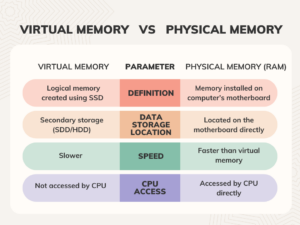
- Physical memory is easy to access and faster; thus, computers use it over virtual memory.
- If the host’s security is compromised, all VMs are at risk.
- Virtual memory uses storage space for long-term data storage.
- When RAM is full, and many pages need to be swapped in and out of the disk, the system can become extremely slow.
Virtual Memory vs Physical Memory
The Bottom Line
Here we wrap up on the blog! The ultimate point is that virtual memory plays a vital role in boosting the capability of computers and servers by extending memory beyond the physical limits of RAM. Even though it is slower than physical memory, it is essential for maintaining system stability and running multiple applications.
In the blog above, we have discussed the key benefits and drawbacks of virtual memory to help you better understand. In the end, it stands as an essential driver of the computer’s operating system.
To stay tuned with more such tech blogs, visit our website right now!
Frequently Asked Questions
1] Is virtual memory as good as RAM?
Ans: In terms of speed, virtual memory is slower than physical memory as it depends on hard disks and SSDs.
2] What is cache memory?
Ans: Cache memory is the small, high-speed memory used to store frequently accessed data, acting as a buffer between the CPU and RAM to reduce access time and improve system performance.
Read More:
From Good to Great – The Top Virtual Assistant Skills for Career Growth
Virtualization Security Best Practices: Secure Hypervisors, VMs, and Virtual Networks