
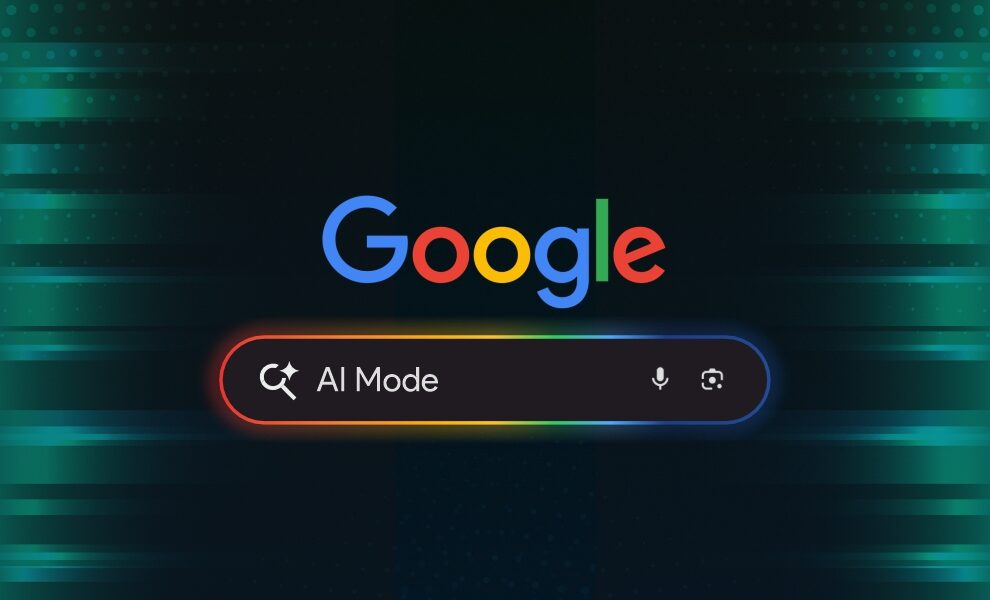
Google AI Mode has been the most significant change to Google Search, and search engines broadly, in the last decade. It is a powerful combination of AI-enabled integration within Google’s search and productivity features. First launched in the US in March 2025, Google AI Mode has since expanded to nearly 200 countries across 98 languages, making it available to almost every Google user as of 2026. No matter if you are a student, businessperson, or simply a curious tech enthusiast, learning about Google AI Mode can help you work smarter and faster.
Whether you have seen the “AI Mode” tab appearing in your search results and wondered what it does, or you want to use it properly across its AI modes and features, this guide covers everything.
What Is Google AI Mode?
Google AI Mode is a dedicated search experience within Google Search, powered by Google’s generative AI Gemini model. Unlike traditional Google Search, which returns a ranked list of links, AI Mode understands complex, multi-part questions and delivers a synthesized, conversational answer with inline source citations. From summarizing complex topics to helping you write better emails; this feature assists you in boosting productivity and discovering information more quickly.
Think of it as Google Search and a Gemini chatbot merged into a single interface. You can ask follow-up questions, search using images via Lens, plan trips, compare products, and build study plans, all without leaving the search bar.
Google’s AI Search Evolution from SGE to AI Mode:
AI Mode did not appear from nowhere. It is the evolution of what Google first tested as the Google Search Generative Experience (SGE) in 2023, an early, Labs-only experiment in AI-generated search summaries. SGE showed Google’s direction but was limited, slow, and prone to errors.
Following the Google June 2025 Core Update, Google formally replaced the SGE experiment with two production features: AI Overviews, automatic summaries in standard Search, and AI Mode, the dedicated conversational tab. SGE is no longer a separate feature; it has evolved into what you see in Search today. So, if you have been searching for what Google SGE is, what “search generative experience” means, or how to enable it, AI Mode is the answer.
AI Mode vs Regular Google Search: Key Differences
The basic difference between Google AI Mode and traditional Search is the search results. Traditional Search can offer website links as results. Whereas AI Mode offers analytical responses, providing personalized information based on multiple sources. It enables conversational assistance, allowing users to dive deeper into the topics they search for.
Apart from that, the search intent of users also differs in traditional Search and AI Mode. Users generally look for navigational information on traditional Search, executing simple fact-checking. On the other hand, users execute research and complex problem-solving on Google AI Mode. Let us discuss the major differences between AI Mode and regular Google Search-
| Feature | Regular Google Search | Google AI Mode |
| Goal | Making information available and accessible through website links. | Enabling conversational, proactive, and personalized research assistance. |
| Interface | page of Search Engine Results Pages (SERPs) with website links. | Conversational chat interface that combines information from different sources and offers details in paragraphs. |
| Interaction Method | Search and click-out. | Conversational, multi-step interaction, and enables follow-ups. |
| Responses | Website links. | Paragraphs explaining the topic with source citations. |
| Best for | Checking specific information, fact checks, website logins, & news updates. | Personalized tasks such as planning an itinerary, deep research, & comparing products. |
| Input Format | Text, voice, and image with Google Lens. | Text, voice, and multimodal. |
| Traffic Model | Direct traffic to websites through links. | Traffic through source citations. It depends on the user’s clicks. |
Google AI Mode vs Google AI Overviews: What’s the Difference?
Many users confuse AI Mode with AI Overviews, the AI-generated summaries that appear at the top of standard search results. However, they work differently. Understanding the differences is crucial to finding out how AI crawlers gather web content to generate the summaries in AI Overviews and how AI Mode operates differently.
| Feature | AI Overviews | AI Mode |
| Where it appears | Top of standard search results automatically. |
Dedicated “AI Mode” tab in Google Search. |
| Conversational follow-ups | No. | Yes, full multi-turn conversation. |
| Multi-part questions | Limited. | Fully supported. |
| Image search (Lens) | No. | Yes. |
| Availability | All users, automatic. | ~200 countries, sign-in required. |
| Canvas / study tools | No. | Yes, unveiled in 2026. |
| Predecessor | — | Google SGE (2023–2024). |
How to Enable AI Mode in Google Search: A Step-by-Step Guide
As of June 2026, AI Mode is available to all signed-in Google users in nearly 200 countries, and no special enrollment is required in most regions. Here are the steps to enable Google AI Mode:
Step 1: Go to google.com and sign in
Make sure you are signed in to your Google account. AI Mode personalization features require sign-in. So, firstly, visit google.com and sign in to experience AI Mode through Search. AI Mode appears in the right corner of the search bar if you try accessing it through Chrome.
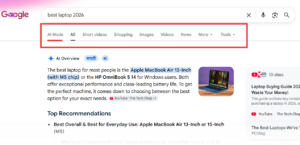
 Step 2: Look for the “AI Mode” tab in search results
Run any search query. At the top of search results, you will see tabs: All, Images, Videos, AI Mode, Forums, and others. Click AI Mode to unlock AI-driven Search.
Step 3: Ask a full, natural-language question
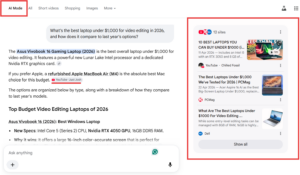
AI Mode works best with detailed questions. Instead of “best laptop 2026”, try: “What’s the best laptop under $1,000 for video editing in 2026, and how does it compare to last year’s options?”

Step 4: Review the cited answer and click sources
Every claim in the AI answer includes a source citation. Click any to read the original article. This is how AI Mode differs from a chatbot, which gives answers without accountability.
Step 5: Ask follow-up questions
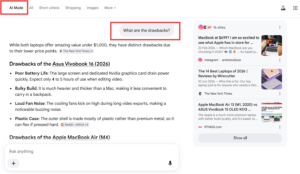
AI Mode maintains full context across your session. You can ask “What are the drawbacks?” without repeating yourself. This will offer a clearer and more in-depth response to your query.
9 Best Google AI Mode Features in 2026
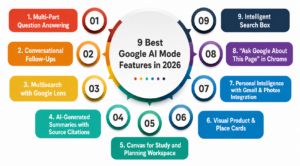
1. Multi-Part Question Answering
Google’s internal data shows AI Mode users ask questions nearly three times longer than traditional keyword searches. It excels at complex and layered questions. For example, you can ask “Plan a 5-day trip to Switzerland in October under $2,000 per person, including accommodation, transport, and food.” Its response will be a structured, actionable itinerary, not just a list of travel blog links.
2. Conversational Follow-Ups
AI Mode maintains full context across your session. Ask about a topic, then follow up with “What are the drawbacks?” or “Give me a simpler version,” and it understands what you mean, exactly like talking to a knowledgeable assistant who remembers the conversation.
3. Multisearch with Google Lens
Combine an image and text in the same query. Photograph a plant, a product, a menu item, or a landmark and add a follow-up question. Lens, combined with AI Mode, is especially useful for shopping comparisons. With such capabilities, you can capture any item and ask AI Mode, “Is there a cheaper alternative with the same specs?”
4. AI-Generated Summaries with Source Citations
Rather than clicking through 5-10 articles, AI Mode synthesizes key information into a single cited answer. Every claim links to its source, making it more accountable than a standalone AI chatbot and more efficient than traditional Search.
5. Canvas for Study and Planning Workspace
Introduced in 2026, Canvas brings a Gemini-like document workspace into Google Search. Ask AI Mode to create a study plan, outline an essay, organize research into a table, or build a structured document, without leaving Search. It’s particularly useful for students and researchers.
6. Visual Product & Place Cards
When researching restaurants, hotels, or products, AI Mode displays visual cards with real-time data, including ratings, reviews, opening hours, prices, and local inventory. If you run an online store, read our guide to optimizing your e-commerce store for AI search.
7. Personal Intelligence with Gmail & Photos Integration
Announced at Google I/O 2026 and rolling out globally, AI Mode can securely connect to your Gmail, Google Photos, and soon Google Calendar to give context-aware answers. Ask “What was the restaurant I booked last month?” and it can find the answer. All connections are opt-in and fully controlled through your Google account settings.
8. “Ask Google About This Page” in Chrome
Lens in Chrome lets AI Mode analyze the web page, PDF, or document currently open in your browser and answer questions about it, no copy-pasting needed. The feature rolled out in 2026 and is accessible from the Chrome address bar by typing a question after the URL.
9. Intelligent Search Box
From I/O 2026, a redesigned search input that dynamically expands for complex queries, offers AI-powered suggestions beyond standard autocomplete, and accepts text, images, files, videos, and Chrome tabs as inputs, a significant upgrade from the classic single-line search bar.
Why Should You Use Google AI Mode?
The advantages of this feature are:
- Saves Time: Instant answers without having to search manually.
- Improves Productivity: Writing, planning, and organizing with AI’s help.
- Enhances Accuracy: More accurate search results and translations.
- Personalized Experience: Suggested based on your interests.
- Advanced Integrations: The feature integrates Google’s other capabilities, such as Lens, Gmail, and Photos, boosting your experience.
Whether you are a working professional wanting to simplify tasks or a student studying effectively, this Mode is a lifesaver.
Wrapping Up!
Google AI Mode is reshaping how we interact with technology, making web search faster, smoother, and more efficient. Moreover, it enables personalization in search responses. So, whether you are seeking information about complex topics or planning an itinerary, the responses will be personalized, proactive, and easy to take action on. By using the powerful features of AI Mode, you can stay ahead in a world where AI is becoming an essential part of daily life.
HiTechNectar is a leading tech publication that analyzes complex innovations so that you adopt them impactfully. Read our expert-led blogs to stay informed.
FAQs:
Q1. Is Google AI Mode Free?
Answer: Yes, the core AI Mode experience is free for all signed-in Google users in supported countries. This includes conversational Search, source citations, Lens integration, follow-up questions, Canvas, and the new Intelligent Search Box. Some advanced features may require a Google One AI Premium subscription, such as extended Gemini capabilities and deeper Personal Intelligence integrations.
Q2. Does Google AI Mode Hallucinate?
Answer: Yes, AI Mode can produce incorrect information, just like any AI system. Google mitigates this by grounding every answer in source citations, so you can verify claims directly. However, the underlying Gemini model is not infallible. Always check cited sources for high-stakes queries, including medical, legal, and financial. For a deeper look at how and why AI systems generate false information, see our blog on AI hallucinations and why source citations in AI Mode are its most important feature.
Q3. How do I access Google AI Mode?
Answer: Sign in to your Google account, run any search on Google.com, and look for the “AI Mode” tab at the top of the results page. In most countries, no lab enrollment is needed as of 2026. If you don’t see it, try signing in or checking if it’s available in your region via Google Search Labs.
Q4. Is Google AI Mode better than ChatGPT or Perplexity?
Answer: All these AI-powered tools and features serve different purposes. AI Mode is embedded in Google Search with real-time web access and source citations, which is ideal for research, current news, and fact-checking. ChatGPT, Perplexity, and other ChatGPT alternatives excel at longer-form writing, coding, and creative tasks. Many users find AI Mode and a standalone AI assistant complementary rather than competing.
Q5. What was Google SGE, and how does it relate to AI Mode?
Answer: Google SGE (Search Generative Experience) was an experimental AI search feature available in Google Labs from May 2023. It was the predecessor to both AI Overviews and AI Mode. SGE is no longer a standalone feature; it has evolved into the AI-powered search experiences available in standard Google Search today.
Also Read:
Top 10 Free AI Note-Taking Apps That Keep You Organized
Text Summarization in NLP: Cutting Through Information Overload with Smart AI Solutions