

Businesses generate enormous amounts of data every day, and managing it effectively is the real job. As per Statista’s big data growth stats, by 2032, the global datasphere is anticipated to reach 924 zettabytes. As AI takes over more parts of the industry, it’s also playing a key role in how organizations work with data. AI data analysis helps by reducing the manual effort required to clean, process, and organize data.
Instead of relying on manual work, like writing SQL queries or using BI tools, AI in data analytics uses AI/ML algorithms to automatically detect patterns, flag errors, and generate insights in seconds. Analysts can ask questions in simple English and get answers, visualizations, and forecasts without any deep technical expertise. In this blog, we’ll cover AI data analysis, how it analyzes business data, the benefits it offers, challenges, and more. So, let’s get started.
What is AI Data Analysis?
AI data analysis uses advanced computational techniques, such as machine learning and natural language processing, to automate and improve how data is prepared, cleaned, and transformed into insights. The approach aims to simplify every stage of the data analysis journey. AI helps analysts identify trends and insights for well-informed business decisions.
For example, a sales manager might ask an AI-powered data analysis tool, “Why did the store’s revenue decline in the past three months?” The system could closely examine the sales records, customer engagement, and trends to identify the reasons for the decline. Thus, AI plays a vital role in today’s data analysis. Its main purpose is to automate repetitive, time-consuming tasks, allowing data analytics teams to focus on key decisions.
From Raw Data to Top Insights: How Does AI Analyze Business Data?
AI data analysis involves a range of steps to automate and streamline manual data analysis, right from preparation to presenting useful information:
- Data Collection: The first step is that AI collects data from different sources at once. For example, in an organization, AI collects data from CRM systems, enterprise resource planning (ERP) software, databases, and more. This gives a complete picture of business performance.
- Data Preparation: Business data contains errors, missing values, and duplicate records. These issues affect analytical results. AI works on analyzing and identifying data quality problems and values that need to be reviewed.
- Pattern Recognition and Trend Analysis: AI can analyze large datasets to unlock patterns that could be difficult to find through manual analysis. For example, an eCommerce business could use AI to identify purchasing trends, compare product performance, and understand customer behavior.
- Data Interpretation: AI identifies patterns in data and analyzes what they mean. Instead of presenting users with complex charts and statistical outputs, an AI system can summarize key findings, describe changes, and suggest areas for improvement.
How AI Enhances the Business Analytics Lifecycle?
AI adds significant value to analytics, not just by replacing current practices. Instead, it strengthens each stage where manual effort is required, or errors are common. When applied correctly, AI helps teams move faster and drive relevant business insights. AI is not here to replace analytics entirely; it is here to enhance the process.
Significant Benefits of Using AI in Data Analysis
The benefits of AI in data analytics revolve around productivity, accuracy, and efficiency. Here are some of the significant benefits: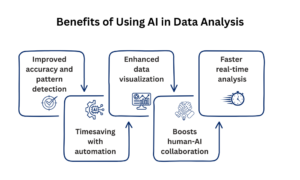
- Improved accuracy and pattern detection: Machine learning models can uncover trends, anomalies, and relationships that humans often miss. This helps to reduce errors and strengthen analytical results.
- Timesaving with automation: Automated workflows, routine data cleaning, sorting, and reporting can be automated, freeing teams to focus on important work.
- Enhanced data visualization: Complex datasets are transformed into easy-to-understand dashboards, charts, and reports.
- Boosts human-AI collaboration: AI doesn’t replace people; it empowers them. Data analysts, managers, and decision-makers can focus on strategy and interpretation while AI does heavy lifting.
- Faster real-time analysis: AI can process large amount of data quickly and update insights constantly, shifting from static reports to real-time intelligence.
Key Capabilities of Using AI in Data Analysis
The key impact of AI data analytics comes from a set of key capabilities that work together rather than in isolation. Below are some of the practical use cases of each:
- Predictive analytics: AI tools make use of historical data to predict trends and outcomes. This helps organizations in decision-making.
- Natural language processing: AI uses natural language processing, allowing analysts to interact with data using everyday language.
- Automated data preparation and cleaning: AI identifies and fixes data inconsistencies, errors, and missing values. This ensures data integrity without requiring any manual involvement.
- Image and video analytics: AI can analyze visual data to deliver valuable insights. It helps to evaluate customer behavior and more.
Use Cases of AI in Data Analysis
Below are some of the popular scenarios wherein AI is used in data analytics effectively:
- Demand forecasting: From the business data, AI can analyze seasonal trends, historical trends, or economic shifts to predict future demands and decisions.
- Churn prediction: Builds behavior profiles to find which customers are likely to leave before they cancel.
- Fraud and anomaly detection: AI monitors data continuously to spot any type of irregular patterns, false transactions or cybersecurity breaches the moment they happen.
- Customer segmentation: It helps in grouping users on the basis of real-time behavior, past purchases, and engagement metrics.
AI vs Traditional Data Analysis: Key Differences
Traditional data analysis is far different than modern AI data analysis. Here we will understand the key differences between both methods.
| Parameter | AI Analytics | Traditional Data Analysis |
| Type of data handled | Structured and unstructured data | Mainly structured data |
| Speed | Faster, involves automation | Slower, needs manual efforts |
| Scalability | Highly scalable | Limited scalability |
| Human involvement | Less human inputs | Depends on human data analysts |
| Insights | Generates predictive and real-time insights |
Generates historical insights |
How to Get Started with AI to Analyze Your Business Data?
Follow the steps below to get started:
Step 1: Use of Clean Data
Make sure the business information or data is accurate and ready for analysis.
Step 2: Pick a Use Case
Choose a specific business problem you want AI to address.
Step 3: Choose a Tool
Pick a data analysis tool that aligns your objectives and budget.
Step 4: Validate Data
Make sure to validate the AI tools to output your data to ensure the insights are accurate.
Step 5: Governance
Govern your AI systems and follow the best ethical practices, security polices, and more.
Challenges Faced in Implementing AI in Analyzing Business Data
Yes. Below are some of the challenges of using AI in data analytics:
- Data quality and silos: AI models need clean and structured data. Companies struggle with messy data and integrating AI into existing systems.
- Integration issues: Connecting AI tools to legacy databases and ERPs can create compatibility issues and workflow bottlenecks.
- Ethical considerations: If AI algorithms are trained on biased or incomplete datasets, they can reinforce social biases and produce inaccurate outcomes.
- Implementation costs: There is a need for initial investment for AI infrastructure, software licenses, and employee training. However, with proper AI adoption, the return on investment can be better.
Which AI Tool is Best for Data Analysis?
Some of the popular tools for data analysis include:
- Microsoft Power BI: Microsoft Power BI is a business analytics and data visualization platform that integrates with programs such as SQL, Excel, and other cloud-based platforms.
- Tableau: Tableau is a popular business analytics software from Salesforce. It helps you understand and visualize data. It transforms raw data into charts, graphs, and dashboards.
Summing It Up!
In short, AI is changing how businesses interact with data. It can identify patterns, predict trends, and help teams make well-informed decisions faster while improving efficiency and collaboration. Successful adoption needs more than simply choosing an AI tool. Businesses should maintain high-quality data, protect sensitive information, and keep human judgment in key decisions. When implemented correctly, AI-powered analytics can help organizations make faster, more informed decisions for long-term growth.
Read more informative blog posts on our website.
FAQs
Q1. What do AI data analysts do?
Answer: Unlike traditional data analysts who rely on past trends and patterns to predict what happens next, AI data analysts use the latest technology, including neural networks and machine learning algorithms, to analyze big data and drive insights.
Q2. Will AI take over data analytics?
Answer: AI isn’t here to completely take over data analytics; instead, it will work alongside human analysts. AI algorithms and models work best at processing vast amounts of data quickly; however, human skills remain important for interpreting results.
Q3. Can AI analyze data in Excel?
Answer: Yes. With available tools and integrations, AI can help analyze Excel spreadsheets, summarize information, create formulas, and generate visualizations.
Also Read:
The Role of AI in Big Data: Unlocking New Possibilities
Decision Tree Algorithm: Making Accurate Predictions with Machine Learning