

With rapid digital transformation, customer expectations have changed as well. For any concern or query, people need quick answers without waiting long.
But how about solving the issue yourself with an informative knowledge base? Well, this is where a self-service knowledge base comes into play, giving customers easy access to answers to their queries through troubleshooting guides, FAQs, how-to guides, and product checklists in one searchable location.
The good news is that there are a range of free self-service knowledge base tools available on the market, making the customer support experience seamless. This blog walks through the five best self-service knowledge base software options to help you choose the right one for your organization’s support needs.
Why Do Customer Support Teams Need Knowledge Base Software?
Customer support teams work 24/7, resolving queries, troubleshooting technical issues, and answering product inquiries via channels like phone, email, and live chat to improve satisfaction and retention.
However, support agents spend most of their time answering repeated queries, which consumes their time and slows response times. Thus, to overcome this challenge, self-service knowledge base software works well by allowing customers to get answers themselves through searchable, well-organized content including:
- Frequently Asked Questions (FAQs)
- Product guides
- User manuals
- Troubleshooting guides
- How-to-guides
- Video tutorials
- and more
To get the right help instantly, the knowledge base software includes a search option, a content management feature, and article categorization. Together, these capabilities help reduce ticket volume and boost customer experience.
5 Free Self-Service Knowledge Base Software for Customer Support
1. Freshdesk
Freshdesk is an AI-powered customer service solution that includes built-in knowledge base capabilities to help customer support teams scale through self-service. It is mainly designed to reduce ticket volumes and improve customer experience. Organizations using Freshdesk can build branded self-service portals and manage content, including DIY product guides, FAQs, and tutorial documents.
No matter if you are building a customer help center from scratch or need to scale operations globally, Freshdesk’s knowledge base offers a self-service solution that’s flexible, intuitive, and can scale with your business. It offers a free program at $0 with up to 2 agents.
Key Features:
- Multi-language support.
- Access to a customer portal.
- Centralize all conversations in one inbox.
- A knowledge base that lets customers find answers instantly.
- Automates repetitive and important tasks.
- Provides access to threads.
Integrations: Microsoft Teams, Shopify, Salesforce, Slack, Jira, and connector apps for customer integration through API.
Best for: Freshdesk is ideal for SMBs, e-commerce support teams, and customer support departments seeking self-service capabilities, automation, and omnichannel ticketing.
2. Document 360
Document 360 is a knowledge base software platform that focuses mainly on knowledge base management and self-service experiences. It allows teams and businesses to create and deliver answers across support, product documentation, user manuals, SOPs, and AI. Document 360 comes with 100+ features for search, and self-service to help teams create a knowledge-based experience with AI. It offers a free trial for 14 days to test all the features. A self-service knowledge base becomes helpful when customers can easily find answers without needing extra support.
Key Features:
- Find exactly what you need with advanced search.
- Let’s you build custom workflows for creating, reviewing, and publishing.
- Translate your knowledge base into 50+ languages around the world.
- Export articles to PDFs.
- Provides role-based access controls.
Integrations: Intercom, Zendesk, Freshdesk, Slack, Microsoft Teams, and GitHub.
Best for: Document 360 is an ideal option for support and product teams that need a dedicated platform to create and maintain an internal knowledge base.
3. Notion
Notion is a free self-service knowledge base software for individual use with advanced AI capabilities. This platform offers a range of knowledge-sharing features and is an all-in-one workspace for teams to capture context, find answers, and automate tasks easily.
Notion allows teams to streamline their entire workflows beyond traditional knowledge management. One of the noteworthy features of Notion is its blank-slate approach, which allows users to customize the tool according to their unique needs. Furthermore, Notion’s search functionality allows users to access documents across apps.
Key Features:
- Built-in and templated knowledge wikis.
- Get answers easily with citations.
- Automate workflows with 24/7 agents.
- Edit together live with comments and instant updates.
- Save anything from the Web to Notion with the Web Clipper.
- Secure single sign-on through SAML SSO.
Integrations: Slack, Google Drive, Figma, GitHub, Jira, and Microsoft Teams.
Best for: Notion is best for creating an all-in-one workspace for teams looking for a tool for knowledge, projects, and databases, and for those willing to maintain their own structure.
4. Zoho Desk
Zoho Desk is a cloud-based support platform that provides companies with an in-built knowledge base, enabling them to deliver quicker, more efficient customer service. It is one of the most commonly used knowledge base tools. It turns customer requests from email, chat, phone, and social media into tickets. Support teams can create, manage, and publish FAQs, guides, product documents, and more to help customers find answers on their own.
Key Features:
- Create and publish a library of information within a single knowledge base.
- Build chat flows to simplify self-service for customers.
- Indexes titles, content, tags and keywords, instantly bringing up relevant articles to help customers find answers quickly.
- Keeps multiple versions of knowledge base articles, enabling teams to review, restore, or roll back prior versions as necessary.
- Assign tickets to your team based on their workload, availability, and skill.
- Give agents the flexibility to access Zoho Desk in 20+ languages.
Integrations: Zoho’s Own suite (Zoho CRM, Zoho Analytics, Zoho Assist). Plus, Slack, Microsoft Teams, and Salesforce.
Best for: Growing support teams that need a reliable, all-in-one help desk with strong self-service and ticketing capabilities.
5. HelpJuice
HelpJuice is one of the best AI-powered knowledge base tools, helping both customers and employees find important information in seconds through self-service. This tool provides fast search, flexible structure, and AI that turns random information into answers. This platform helps to reduce support volume by up to 70% by empowering users to find answers quickly.
Key Features:
- Cut down on repetitive training sessions and recurring questions from your team.
- Create or update articles by allowing AI to do it on your behalf.
- Secure data with SSO, access controls, firewalls, and backups.
- Rich formatting, versioning, and internal blocks.
Integrations: Slack, Salesforce, Zendesk, Google Analytics, and Zapier.
Best for: Growing teams that need an advanced, scalable knowledge base with powerful search and analytics.
Factors to Consider While Choosing Free Self-Service Knowledge Base Software
Choosing the right knowledge base tool goes beyond simply going for a free plan. It’s important to consider a few factors to choose the right platform for your support needs and business growth. Here are a few key factors: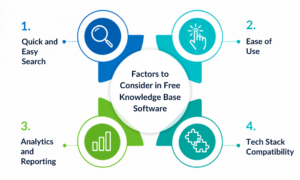
- Quick and Easy Search: If customers cannot find the answers quickly, they will leave the knowledge base. Thus, it is necessary to find a tool that offers robust search support, including smart filtering, keyword matching, suggested articles, and more.
- Ease of Use: A knowledge base works well if all the information is up to date. Look for a platform where teams can easily create, manage, and publish content without extensive training.
- Analytics and Reporting: It is essential to keep track of your knowledge base. Analytics and reporting give insights into which articles are performing the best, what customers are searching for the most, and more.
- Tech Stack Compatibility: The knowledge base software should connect with your existing live chat, customer help desk, or CRM with ease.
Wrapping It Up!
It is essential to choose the right self-service knowledge base software with excellent support and enhanced experience. By giving customers quick access to accurate information, businesses can improve satisfaction, lower ticket volumes, and empower teams to focus on strategic interactions.
To read more informative blog posts around the tech world, visit our website now.
FAQs
1] Is open-source knowledge base software a good option for customer support?
Answer: Yes. Open-source tools are cost-effective and flexible, offering users customization and control. However, these tools need technical skills for setup and maintenance, making them ideal for in-house developers.
2] Does your business need free knowledge base software?
Answer: Yes. It doesn’t matter if you are running a small business or an enterprise-scale business; you need knowledge base software because: Without a knowledge base, employees spend more time looking for information, reducing productivity.
3] What is the difference between a self-service knowledge base and a help desk?
Answer: A knowledge base provides self-service information, while a help desk manages tickets and direct interactions with support agents.
Also Read:
Choosing the Right Customer Communication Tools for Your Team
CCaaS and CRM Enhancing Customer Engagement in Unique Ways
Enhancing Team Coordination with Project and Task Management Tools in Service Businesses
4 Use Cases Guide of Artificial Intelligence for Better Customer Experience