

How about exploring the product you need through the popular AI platform? Let us tell you!
AI-powered discovery is a hot topic today, and people are shifting to AI platforms to research companies, compare products, and even make purchasing decisions. So, businesses have a solid chance to enhance their online presence across these platforms. Given this shift, OpenAI has introduced Businesses in ChatGPT, with a new Business Hub to manage it.
This new beta initiative allows businesses to claim their profiles on ChatGPT, manage their information, and understand how customers engage with them. Through OpenAI’s new Business Hub businesses can claim their presence in ChatGPT, maintain accurate information, track insights, and create AI-powered Business Agents to answer customer questions.
But you might want to know exactly how to claim your business in ChatGPT, how to get started, the benefits it offers, and more. So, let’s get started.
What’s OpenAI’s New Business Hub?
OpenAI’s new Business Hub in ChatGPT lets businesses create and manage profiles. The feature was announced on November 10, 2026, and is currently in beta. With this, businesses can claim their business, manage information, and see how people interact with it on ChatGPT.
Alongside this, the company is adding a new way wherein businesses can interact with users through Business Agents, starting with eligible eCommerce and online service businesses in the US. This aims to improve how businesses discover and interact with the AI platform, enhancing consumer decision-making.
What Does Claiming a Business in ChatGPT Actually Mean?
Claiming your business in ChatGPT means verifying ownership of your company profile, updating your business information, tracking user engagement, and getting a blue verification checkmark on your profile. If you are authorized to represent the business, you can claim it and complete the verification to manage information, add product feeds, and view insights such as mentions and website clicks.
This gives businesses a new way to provide information to ChatGPT, allowing people to explore their products and services with the most up-to-date, accurate information. Yes, any eligible business located where ChatGPT is available can claim their business in ChatGPT through Business Hub. Good news for Enterprise customers and advertisers: they can work directly with OpenAI representatives to claim their business.
A Quick Example:
When you ask ChatGPT to recommend the best tech companies, the platform will display relevant business information. When your business is claimed, you can maintain the profile information and help customers understand your offerings.
What are the Strategic Benefits of Claiming Business Profiles on ChatGPT?
With the widespread use of AI platforms, getting your business discovered is a feather in your cap. It not only helps with discovery; it also improves engagement and business visibility. Here are some of the key advantages:
- Maintain Business Information: You can update your website, business description, logo, and delivery policy by opening your profile in Business Hub. You can also add a cover photo and other details. This way, customers get reliable information when they try to explore your business through ChatGPT.
- Connect a Product Feed: If you’re in eCommerce, ChatGPT lets you connect a product feed, including a Shopify feed, to share prices and availability. You can even upload a CSV product feed that follows the product feed specifications.
- Understand Customer Engagement: You can also get profile insights. After your claim and Persona verification are approved, open your business in Business Hub and select Insights. Companies can monitor:
- Mentions: How often ChatGPT references the business website or displays its local business listing.
- Website clicks: Shows how often people click through to your website.
- Discovery topics: Common themes ChatGPT answers that mention or cite your business.
- Control how your business is seen in ChatGPT: Help customers find information about your business by updating key details in Business Hub.
How to Claim Your Business in ChatGPT? Key Steps Involved
Businesses can use OpenAI’s Business Hub to claim and manage their profiles. Follow these steps. The process mainly includes finding business listings, verifying ownership, and completing identity verification.
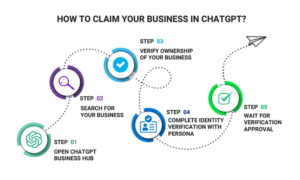
Step 1: Open ChatGPT Business Hub
Sign in to ChatGPT and open Business Hub from the sidebar. Search for your business by name.
Step 2: Search for Your Business
Search for your company using its business name. If the listing matches your company, confirm the ChatGPT account you’ll use to manage it.
Step 3: Verify Ownership of Your Business
Choose one of the available verification methods. These options mainly include:
- Verify with your business phone
- Verify with your website domain
- Verify with your Shopify store.
We have added details about the verification below. OpenAI also sends an email about claim approval, which you need to wait for.
Step 4: Complete Identity Verification with Persona
After your claim is initially approved, you must complete identity verification with Persona before publishing changes to your business information, connecting a product feed, viewing insights, or creating a Business Agent (if your business is eligible).
You should have a government ID, business registration information, and proof that you are authorized to represent the business.
Step 5: Wait for Verification Approval
In this stage, OpenAI reviews your Persona verification submission and emails you the decision or may request additional information. While the approval is under review, you can select Cancel submission to cancel the request.
Ways to Verify Your Claim in ChatGPT
There are different ways to verify your claim. They are as follows:
- Verify with business phone: Choose Business phone, then choose SMS text or an automated call. Click Get code, then enter the code sent to the number shown.
- Verify with website domain: Select the Website domain, then add the TXT record shown in ChatGPT to your domain’s DNS settings. Also, copy the type, name (or host), and value exactly as shown. Click on the Verify domain in ChatGPT once the DNS changes are updated.
- Verify with your Shopify store: Select Shopify store and then Connect Shopify. Follow the steps given below to complete the verification:
1. Check the permissions and select Log in to Shopify
2. Sign in to the Shopify store for the business you need to claim.
3. Follow the on-screen prompts to complete the verification process.
After you claim your business in ChatGPT, OpenAI reviews your claim and emails you the decision. The company can also ask for more information. While your claim is under review, you can select Cancel claim to cancel the request.
Who is Eligible to Claim Business in ChatGPT?
There are certain eligibility rules to claim your business in ChatGPT. Take a look at the below mentioned:
- You can claim a business in ChatGPT if you are an owner or are authorized to represent it.
- You need to verify your connection to the business and be approved.
- Eligible businesses can claim their existing business or add one where ChatGPT is available.
Business Agents have separate requirements. They are currently available to eligible eCommerce businesses with a website in the US. Your business must also meet the industry requirements mentioned in the Business Agents Policy.
Is Claiming Your Business in ChatGPT Worth It? The Final Take!
The new buzz around claiming a business in ChatGPT marks a major shift in how the AI platform is used for business discovery. Customers largely rely on AI platforms like ChatGPT to search for the simplest things, whether comparing products, asking for recommendations, or evaluating services. So, businesses need to establish their presence across these platforms.
Claiming a business in OpenAI’s ChatGPT Business Hub provides a great opportunity to maintain accurate company information, access engagement insights, and explore additional customer interaction features where eligible. While claiming doesn’t increase sales, it shows how your business contributes to ChatGPT’s presence and opens the door to AI-driven discovery. We hope the blog gives you a clear idea of ChatGPT’s new feature.
Read more informative blog posts on our website.
FAQs on Claiming Your Business in ChatGPT
Q1. What does claiming your business change?
Answer: Claiming your business lets you update all the information in ChatGPT, and if eligible, create a Business Agent. A blue check will then appear on your business profile in ChatGPT to display its claims. Claiming is available initially to eligible businesses with a website.
Q2. Will my business be seen if I don’t have an agent?
Answer: Yes. ChatGPT may show information about your business, whether or not you have an agent, when customers ask relevant questions. With a Business Agent, customers can start a conversation with your business based on the information you’ve shared.
Q3. Does OpenAI share customer conversations with businesses?
Answer: No. Businesses receive aggregated engagement insights, not individual user prompts or private conversations. Chats taking place between customers and Business Agents are not shared with businesses as individual conversations.
Recommended Reading:
ChatGPT Search vs. Google Search: How do they differ?


