
Mobile applications are entering an era where AI processes data locally rather than relying on the cloud. Imagine using a translation app during a call when Wi-Fi suddenly drops. The captions continue appearing normally instead of showing a loading or reconnecting message.
This is possible because smartphones now have dedicated hardware and software frameworks that support on-device AI. It works quietly in the background, which is why almost every mobile roadmap now includes it, from fintech fraud teams to camera app developers.
The term is often used loosely to describe AI that responds quickly. However, it is important to understand what is actually changing. The engineering trade-offs differ from the cloud-first approach most mobile teams know.
For developers, this changes how they run and manage the model. Local inference can change how quickly an app responds. It also determines what data leaves the device. Features can continue working without an internet connection. The app can also use battery and hardware resources differently.
On-Device AI: What Developers Need to Know
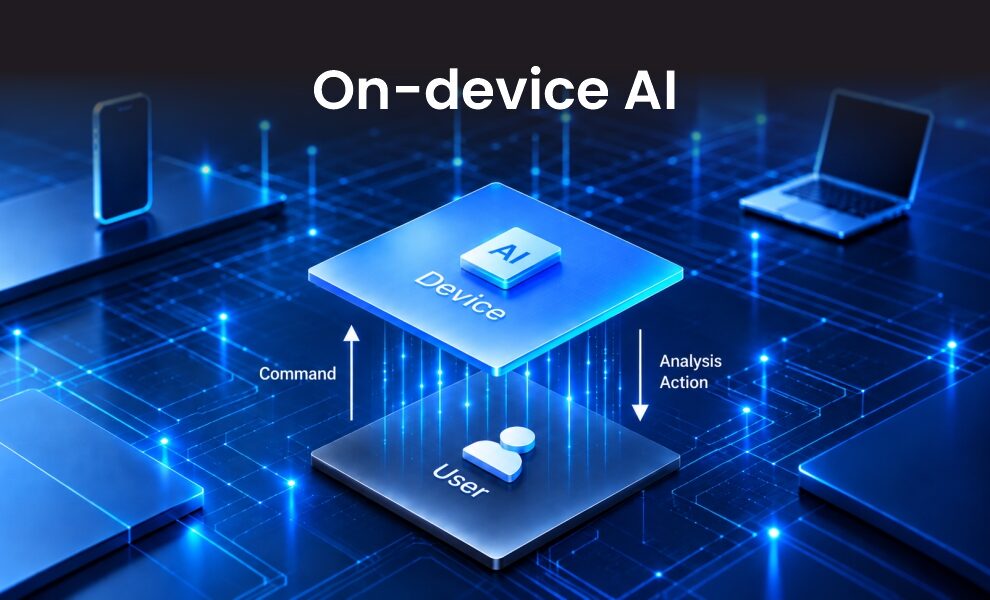
On-device AI means running a trained AI or machine learning (ML) model directly on a smartphone or other edge devices instead of sending every input to a remote server.
The process is straightforward. A mobile app captures an input such as an image, voice recording, text, or sensor signal. The model processes the input locally and returns an inference without requiring a round trip to the cloud. Training, however, still happens in the cloud using much larger infrastructure.
This approach is also known as edge inference. Google’s LiteRT can run AI models on Android, iOS, and other edge platforms. It also supports acceleration through the CPU, GPU, and NPU.
Why Is On-Device AI Becoming More Common in Mobile Apps?
On-device inference is not new. The big difference today is that anyone can use this reliably. Several developments have driven this shift.
- Smartphone chips are more capable: Modern smartphones include dedicated AI accelerators such as NPUs. These chips can handle increasingly complex AI workloads directly on the device.
- AI models are getting smaller: Techniques such as quantization, pruning, and distillation reduce model size. This makes models easier to run within mobile memory and power limits while maintaining much of the original accuracy.
- Mobile AI frameworks are improving: Platforms such as LiteRT and Apple’s Core ML make local model deployment easier and improve access to hardware acceleration.
On-Device AI vs Cloud AI: Which Approach Fits Mobile Apps?
You do not have to choose one approach exclusively. Cloud AI remains important for complex tasks and workloads that require more power than a device can provide.
On-device inference is useful for frequent tasks that need fast results, protect sensitive data, or can run locally.
Factor |
On-Device AI |
Cloud AI |
| Best used for | Frequent tasks and real-time interactions | Complex AI workloads and advanced processing |
| Response speed | Faster because processing happens on the device | Depends on network and server performance. |
| Connectivity | Can continue working offline | Usually needs internet access |
| Data processing | Data can stay on the device | Data is processed on remote servers |
| AI model support | Works best with optimized models | Can support larger and more advanced models. |
| Maintenance | Model updates may need to reach user devices |
Updates can be deployed centrally |
| Common mobile use cases: | Voice commands, translation, image enhancement |
Chatbots, large language models, advanced analytics |
Which Mobile App Features Benefit from On-Device AI?
Local inference is not necessary for every AI feature. It is most useful when an application needs quick responses or must continue working without an internet connection.
Some mobile features are a natural fit for this approach:
- Camera apps: Object detection, image enhancement, and scene recognition can run directly on the device.
- Voice features: Speech recognition and local voice commands can work locally without always relying on the cloud.
- Productivity apps: Text summarization, rewriting, and classification can be handled on the device.
- Translation apps: Selected language tasks can run locally even without a constant internet connection.
- Personalized experiences: Some apps can use information already on the device to provide recommendations or suggestions.
- Interactive applications: Real-time vision, audio, and gesture-based features can benefit from local processing.
What Developers Need to Consider Before Adding On-Device AI
Before moving AI to the device, it is worth looking at the devices your users actually have. The model needs to run efficiently without putting too much pressure on memory, battery life, or device resources.
Developers also need to decide whether a task should run locally or should be handled by the cloud. Performance can vary across devices, making real-world testing an important part of deployment.
Common Challenges of On-Device Artificial Intelligence
- On-device Artificial Intelligence is becoming easier to use, but deployment can still be challenging.
- A model that performs well on a high-end smartphone may not deliver the same results on older devices.
- Updating local models can also take time because changes need to reach users’ devices.
- AI features that run continuously, such as camera-based apps, can also increase device heat and affect performance over time.
How to Build a Better On-Device Artificial Intelligence Strategy
- Start by identifying features that need fast responses, offline access, or local data processing.
- Choose AI models that match the device’s available compute power and memory.
- Focus on response speed, battery impact, accuracy, and memory usage needs throughout testing.
- A combination of local and cloud AI is often effective. The device handles everyday tasks, while the cloud handles workloads that require more resources.
- Developers don’t have to build everything from the start. Mobile platforms already provide tools for running AI models on devices. Android supports on-device AI through technologies such as Gemini Nano, AICore, and AI Edge tools. Apple offers similar capabilities through Core ML.
Concluding Remarks!
On-device AI is changing how mobile applications run AI workloads. It is no longer limited to a small set of use cases and is becoming a practical option for mobile development. As mobile hardware and development frameworks continue to improve, more teams can evaluate local inference as part of their AI strategy.
However, local inference is not the right choice for every workload. The goal is not to move every AI task to the device but to identify where local processing delivers the most value. The challenge is not deciding between on-device and cloud AI, but understanding where each approach works best and how to use them together effectively.
For more such informational blogs, please visit our official website now!
FAQs
Q1. Will mobile apps replace cloud AI with on-device AI
Answer: Not completely. Many mobile applications use both on-device and cloud AI. Tasks that can run efficiently on the device stay local, while more demanding workloads are handled in the cloud.
Q2. Can I run AI on my phone?
Answer: Yes, you can use AI on your smartphone. You can make use of AI applications, built-in AI features, or web tools like AI mode in Google Search.
Q3. Are iPhone and Android devices equally capable of running on-device artificial intelligence?
Answer: Both iPhone and Android devices can run on-device AI, but the experience can differ across devices. Factors such as hardware and software can affect how well AI features perform. As a result, some devices may support more advanced features or deliver faster performance than others.
Recommended For You:
10 Best OCR Apps for Mobile Phones (Android & iOS)