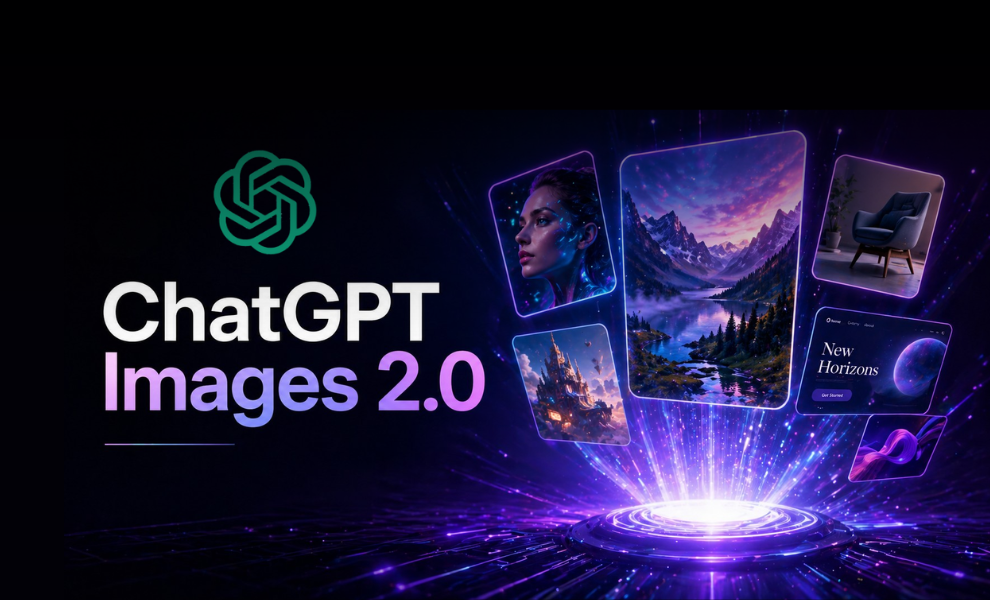
Your AI-enabled image generation game just got upgraded as OpenAI released its latest ChatGPT Images 2.0 model. Users can now generate a series of images with just one prompt. OpenAI released ChatGPT Images in 2025, understanding that AI can generate both beautiful and useful images.
Unveiled on April 21, 2026, ChatGPT Images 2.0 is the upgraded version of the previous model with the ability to address complex visual tasks while producing precise and immediately usable visuals. With detailed instructions following, placing and relating objects accurately.
While commencing a new era in image generation, OpenAI’s latest model is now available for users with thinking capabilities and greater control. In this blog, we will learn the key features of the new image generation model alongside understanding what exactly has changed from the previous model, its availability, pricing, and limitations. So, let’s get started.
Features You Cannot Ignore in Images 2.0
Greater Precision and Control:
The new model can offer what users actually ask for with higher precision and control. With intense specificity and accuracy, the model can conceptualize sophisticated images while bringing that vision to life effectively.
Images 2.0 can follow instructions alongside preserving requested details and rendering the fine-grained elements, including small text, UI elements, iconography, and subtle stylistic constraints. The rendering is possible at up to 2K resolution in the API.
Stronger Across Languages
ChatGPT Images 2.0 brings better multilingual understanding. It can generate visuals that include accurate text in multiple languages. This approach is useful for global campaigns and localized content.
According to OpenAI, the model handles non-English prompts more reliably than before, such as Japanese, Korean, Chinese, Hindi, and Bengali. Such a capability reduces the need for translation steps and improves output consistency.
Stylistic Sophistication and Realism
The model shows clear improvement in style handling. It can follow artistic directions with better consistency and depth. Whether users want photorealism, illustrations, or UI mockups, the outputs feel more refined.
Reports highlight improved lighting, textures, and composition. It makes ChatGPT Images 2.0 more suitable for professional use cases.
Flexible Aspect Ratios
Users now have more control over output formats. ChatGPT Images 2.0 supports different aspect ratios based on use cases, including as wide as 3:1 and as tall as 1:3. This includes square, portrait, and landscape formats. It helps creators design for social media, websites, and presentations without extra editing.
Real-World Intelligence
The model shows a stronger understanding of real-world context. It can place objects logically and maintain spatial relationships. OpenAI notes that this improves usability for product mockups and design tasks. Whether it is synthesizing information, writing the story, or laying it out with a clean structure, the outputs feel more practical and ready to use.
What Exactly Has Changed from the Previous Model?
ChatGPT Images 2.0 builds on earlier image generation capabilities with deeper reasoning. The earlier version focused on visual quality. The new version focuses on instruction accuracy and usability.
One key change in the new model is better prompt adherence. The model now follows detailed instructions more closely. It reduces common issues like missing elements or incorrect layouts.
Text rendering in Images 2.0 has improved compared to the previous model. Earlier models struggled with readable text inside images. ChatGPT Images 2.0 handles this more effectively, especially for UI designs and posters.
The model also integrates better with ChatGPT workflows. Users can refine outputs through conversation instead of restarting prompts. This makes the creative process more interactive and efficient.
How to use Images 2.0 Across Platforms?
ChatGPT Images 2.0 is accessible within ChatGPT and through APIs. Users can start by entering a descriptive prompt in ChatGPT. The model generates images based on the given input.
Users should provide clear instructions for better results. Mention style, objects, layout, and text details. Iteration is key to generating better and more accurate outputs. Users can refine outputs by giving feedback in follow-up prompts.
Developers can use the API to integrate image generation into apps. OpenAI supports high-resolution outputs and customization options. This makes the model useful for design tools, marketing platforms, and automation workflows.
How Can You Access ChatGPT Image 2.0?
Follow the simple steps given below to access ChatGPT Image 2.0:
- Go to chatgpt.com
- Make sure you are using the latest model, wherein the 2.0 is built in interfaces.
- Type the prompt to generate the images.
- You can also ask for modifications by uploading the image.
Example Prompts You Can Use to Generate Images of Your Choice with ChatGPT Image 2.0
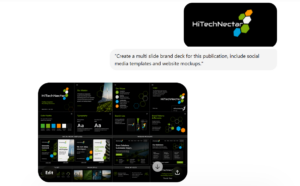
Prompt 1: A Complete Brand Guideline
Before: A simple publication logo is uploaded.
After:
| “Create a multi slide brand deck for this brand. include social media templates and website mockups” |
Check out the results with the above prompt.
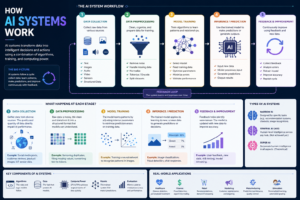
Prompt 2: Make an Infographic
| “Create a technical infographic in English explaining how AI systems work. Clean, modern design with data flow diagrams and clear annotations.” |
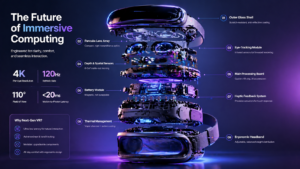
Prompt 3: Marketing in Every Ratio
| “Generate a high-tech VR headset exploded view with detailed component labels and promotional copy. Clean high-tech 3D rendering, studio lighting, glowing accents, soft purple-blue gradient background. Vertical stacked exploded view of 9 layers with precise callout labels on left and right sides. Ratio: landscape.” |
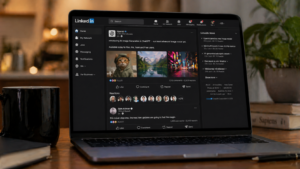
Prompt 4: Create a Mockup of LinkedIn
| “A cinematic 16:9 hyper-realistic shot of a laptop, slightly angled. It’s the LinkedIn timeline that talks about OpenAI new ChatGPT image model.” |
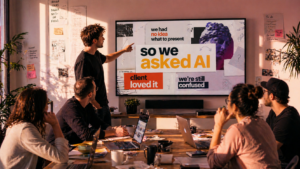
Prompt 5: Realistic Photos
| “A 16:9 hyper-realistic shot of a creative agency presentation room. Mood is warmer, more lived-in: sketches on walls, laptops, coffee cups. The main screen shows a designed slide with editorial composition: layered typography, overlapping elements, hierarchy. Text reads: ‘we had no idea what to present’ ‘so we asked AI’ ‘client loved it’ ‘we’re still confused’. Natural daylight entering the room, soft magenta shadows. Realistic screen rendering, no distortion.” |
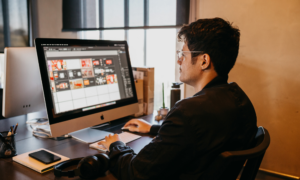
Prompt 6: Nostalgic Photo Filter
Before: A simple photo captured with a desk giving nostalgic vibes. Here is the image upload alongside the prompt.
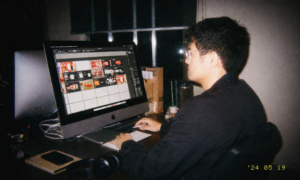
After:
| “Apply a nostalgic filter on it like I shot this with a disposable camera and a big flash; it’s nighttime.” |
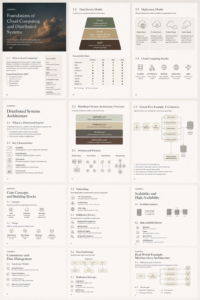
Prompt 7: A full course on Cloud Computing
| “Create a series of textbook pages explaining cloud computing and distributed systems architecture. Use technical diagrams, system flows, and structured explanations in a professional academic format.” |
This is how the output looks like:
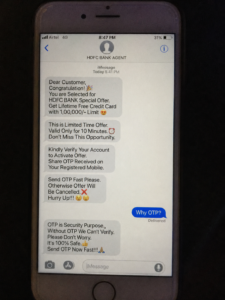
Prompt 8: Fake iMessage
| “A grainy iPhone 7 photo showing an iMessage chat with a fake “bank agent” pushing a limited-time offer, asking for an OTP to “verify,” using urgent tone, broken English, and old-school emojis.” |
Limitations of ChatGPT Images 2.0
Images 2.0 has specific limitations instead of embracing major improvements. Complex prompts can still produce inconsistent results. Fine details may differ across multiple outputs. Alongside that, there are also safety restrictions on Images 2.0.
The model avoids generating harmful or misleading visuals. It includes sensitive content and certain real-world scenarios. Another limitation is the compute cost. High-quality image generation requires more processing power, which can affect speed and pricing for large-scale use.
Pricing and Availability of the Model
ChatGPT Images 2.0 is available through ChatGPT and OpenAI’s API, where the pricing of the model relies on the usage and output resolution. Higher quality outputs may cost more due to compute demands.
OpenAI has introduced the latest model as a professional-level tool, designed for creators, developers, and businesses. The model marks a strong step forward in AI image generation with improved control and realism.
Follow our blog updates and never miss any tech updates and announcements!
FAQs:
Q1. Is ChatGPT Images 2.0 free?
Answer: ChatGPT images 2.0 is available for free but with usage limitations.
Q2. Which AI is free for image generation?
Answer: Microsoft Copilot/Bing Image Creator, Leonardo.Ai, Adobe Firefly, and Canva are free tools for AI image generation.
Q3. How to make a realistic photo in ChatGPT?
Answer: Users have to be specific with their prompts to generate realistic photos in ChatGPT. Being precise, direct, and meaningful with prompts can significantly help in this regard.
Also Read:
How to Create Free Ghibli-Style AI Images & Animated Videos Using ChatGPT, Grok-3, and Gemini?
Generate AI Images on WhatsApp Using ChatGPT Easily; Here is a Step-by-Step Guide