

The modern IT infrastructure is evolving rapidly. With new technologies making a significant impact and allowing organizations to operate efficiently, improve performance, and drive innovation forward.
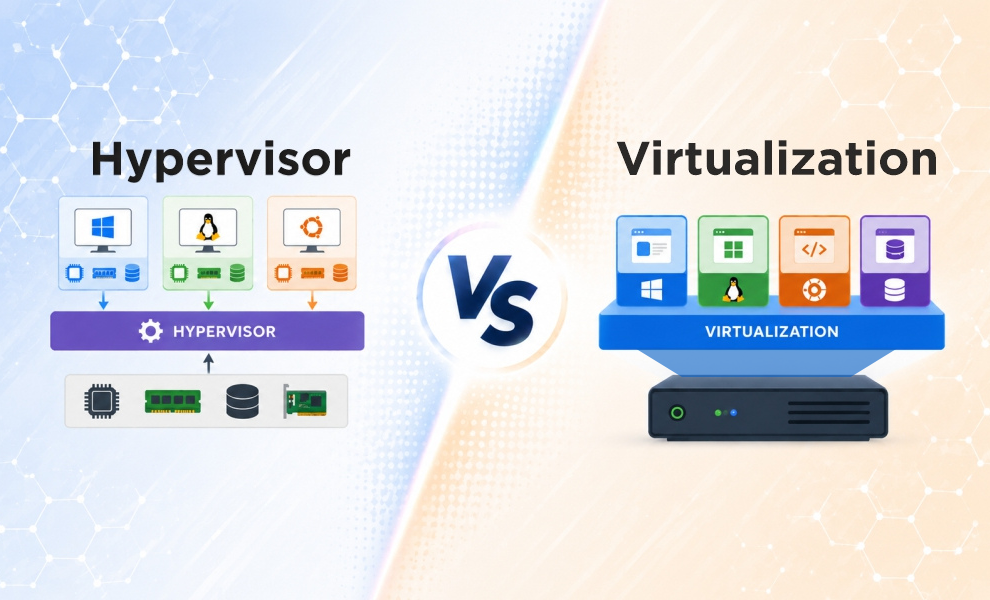
Two popular technologies used in computing environments are Virtualization and Hypervisors. Even though both of these are used interchangeably, there are clear differences between the two. Virtualization is the technology that allows OS instances to run parallel on a single physical machine.
At the heart of virtualization lies, a hypervisor that allows several VMs to run on a single physical server. To understand briefly about both the terms, keep reading the blog until the end. We’ve listed the pros, cons, and best use cases of each to help you choose the right tech stack to optimize your IT environment.
What is Virtualization?
Virtualization is basically a technology that allows for creating virtual computing environments such as desktops, servers, or networks on a single physical machine. Through this, IT professionals can make use of the physical machine’s full capacity, and separate compute, storage, and other resources so they can be allocated efficiently to multiple workloads.
Each with its own OS and applications, although they share the same hardware. The main purpose of virtualization is to optimize resources and get better returns for their investment. Alongside, offers the desired scalability, and flexibility your business needs to thrive.
What is Hypervisor?
A hypervisor is a software program that is used to run several virtual machines on a single host machine. It’s the key technology behind virtualization. In hypervisors, every virtual machine has its own operating system, and other hardware resources such as RAM, CPU, storage, and more. A hypervisor is also called a virtual machine monitor (VMM).
They basically support the creation and management of virtual machines (VMs) by separating computer software from its hardware. They make virtualization possible by interpreting requests between the physical and virtual resources.
There are mainly two types of hypervisors as mentioned below:
- Type 1 or bare metal
- Type 2 or hosted
A type 1 hypervisor functions directly on the hardware without the need of an operating system.
Examples include: Microsoft Hyper-V, KVM.
Type 2 hypervisor runs as a software layer on the top of an operating system, such as Windows. Linux, or macOS, allowing users to create and manage multiple virtual machines on a single physical device.
Examples include: Oracle VirtualBox, VMWare Workstation
Key Differences Between Virtualization and Hypervisor
Parameter |
Virtualization |
Hypervisors |
| Core Purpose | Technology that creates virtual resources and abstracts physical layer | Software that enables virtualization |
| Function | The main function is to create virtual environment for managing workloads | Allocate system resources to each VM it manages |
| Dependency | Needs a hypervisor or similar technology to function | Exists to enable virtualization |
| Cost | It is budget-friendly compared to hypervisors | It is less budget friendly as compared to virtualization |
| Examples | Desktop virtualization, server virtualization | VMware ESXi, Microsoft Hyper-V, Xen, VirtualBox. |
Pros and Cons of Virtualization
Pros:
- Cost-Effective: It helps to cut down the need for purchasing actual hardware, alongside the maintenance cost of the same.
- Efficient resource usage: It maximizes hardware utilization by running multiple VMs on a single physical server. This also helps in efficient resource usage and better efficiency.
- Disaster Recovery: In case of any events such as natural disasters or attacks, virtualization allows quick backup and regains access to IT infrastructure, avoiding business disruption.
- Scalability: Virtualization enables rapid, cost-effective scaling by allowing businesses to deploy additional virtual machines without investing in new physical hardware.
Cons:
- Initial Setup Cost: Creating a virtual server initially needs both time and money. This includes the license costs, special skills, and knowledge that might require training.
- Security Concerns: Virtual environments are prone to attacks such as weak VM isolation, hypervisor breaches, and can disclose sensitive data.
- Complexity: Although virtualization improves efficiency, it can add complexity to IT management and demand skills to deploy, manage and troubleshoot through virtual environments.
Pros and Cons of Hypervisors
Pros:
- Speed: Hypervisors can create VMs instantly. This way, resources can be provisioned at a faster rate as required for dynamic workloads.
- Portability: IT teams can easily allocate storage resources, memory, and networking across multiple servers as required. VMs can also be copied or migrated between physical hosts with minimal downtime.
- Higher Efficiency: Hypervisors deliver higher efficiency, as multiple virtual machines share a single physical server, cutting down hardware costs, efficient resource utilization, and energy consumption.
- Scalability: Instead of using separate machines for different workloads, hypervisors create multiple VMs to run several workloads on one physical machine, leading to scalability.
Cons:
- Performance Overhead: Virtual machines can be slower in terms of performance due to sharing of resources.
- Single Point of Failure: In the event of the host server or hypervisor failure, all virtual machines can be impacted at once.
- Licensing Cost: Hypervisor management tools and licensing can be costly.
- VM Sprawl: System admin keeps a check on the VMs and manages them appropriately. However, they can face issues like VM sprawl that leads to resource waste.
Best Use Cases of Virtualization
Legacy Applications
Many organizations operate on legacy applications with old hardware and operating systems. Virtualization allows businesses to run these apps on modern hardware by creating VMs that mimic the older systems.
Fosters Remote Work
With virtual desktops, employees can work from anywhere securely. This helps organizations to support remote work, while improving productivity, and maintaining control over the desktop environment.
Software Development and Testing
Virtualization technology is primarily used by developers to set up isolated environments. A developer can install and run Linux, Windows or macOS simultaneously on a single laptop or workstation.
Datacenters and Server
In traditional datacenters, every physical server runs on a single app. Using virtualization, several VMs run on the same physical server allowing businesses to combine their infrastructure and reduce the number of physical machines required.
Best Use Cases of Hypervisors
Hypervisors are an important part of IT environments. Here are some of the popular use cases, or scenarios wherein hypervisors work the best.
Cloud Computing
Hypervisors are largely used by cloud providers to provide virtualized environments to clients. This technology helps them develop scalable cloud services, which is ideal for simple web hosting to large-scale enterprise clients.
Development and Testing
Hypervisors are ideal for developers who need separate testing environments. It lets you create VMs to test applications and mimic real-world environments with no impact on your actual systems.
Desktop Virtualization
Employees make use of desktop virtualization to create virtual desktops that can be accessed remotely. It helps to emulate the workstation computing environment on the server, making it a valuable option for employees and organizations.
Virtualization vs Hypervisor: Which Should You Choose?
If your top priority is infrastructure cost management, or reducing the number of physical servers, or remote working across large numbers, then the first step to take is to get a solid virtualization strategy in place.
If you are in the process of migrating to the cloud, there is almost no doubt that you should use a Type 1 hypervisor as the foundation. A Type 2 hypervisor is a great option for new virtualization environments or dev/test environments because it provides a low barrier and cost-effective entry point. Finally, it depends on the demands of your workload, team skills, and future IT plans.
Final Thoughts!
Virtualization and hypervisors both are closely connected technologies but serve different purposes. Virtualization is a technology that creates a virtual environment, whereas hypervisor is a software layer for running and managing these environments. For organizations looking for cloud adoption, digital transformation, understanding all the key concepts about virtualization and hypervisors is necessary. Both offer their own specific benefits and use cases. However, the choice totally depends on your requirements.
To check out more trending blogs around the tech landscape, visit our website now.
FAQs
Q1. What are the 5 levels of virtualization?
Answer: The 5 levels of virtualization are as follows:
1] Instruction Set Architecture ISA level
2] Hardware Abstraction Level
3] Operating System Level
4] Library Level
5] Application Level
Q2. What are the four types of cloud networking?
Answer: The four types are: Public cloud, Private, Hybrid, and Multi-cloud.
Q3. Why is KVM better than VMWare?
Answer: KVM is considered better than VMWare due to its higher performance, freedom from vendor lock-in, and no licensing cost.
Recommended For You:
App Virtualization Software Performing Simulation Creates Virtual Computing Environment
10 Incredible Open-Source Hypervisor Technologies